This review contains affiliate links. If you buy through them, we may earn a commission at no extra cost to you.
Logitech G305 Review 2026: Months of Battery, One Real Trade-Off
Last updated: 21 November 2026Research-based review
The G305 is the mouse people keep recommending years after launch, and the reason is simple: it runs for months on one AA battery and the sensor just works. This review is built from published specs and owner feedback, not hands-on testing. No score, because a score would need a testing method we do not claim.
The verdict
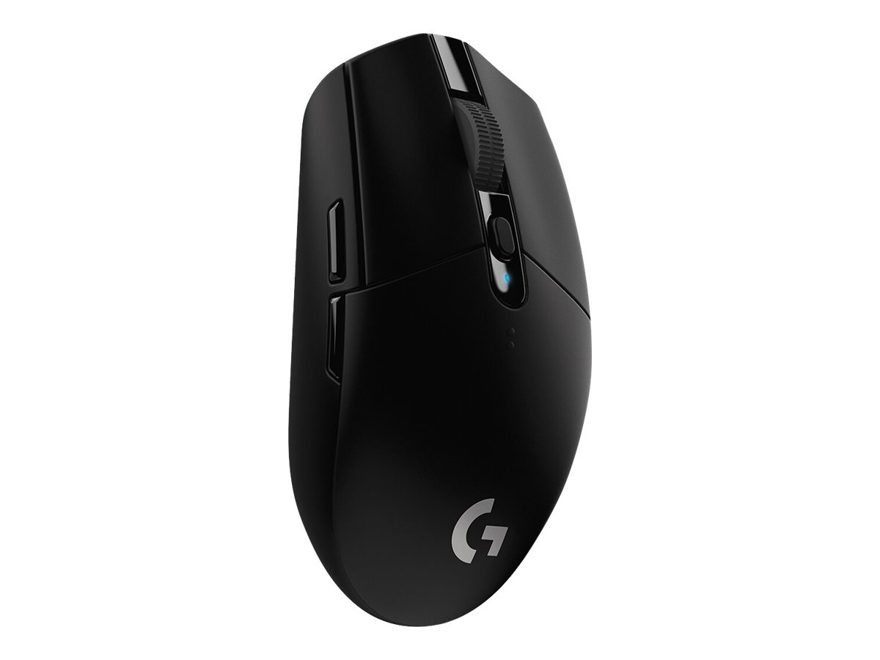
Buy the G305 if you want proven wireless on a budget and you hate charging. The HERO sensor tracks with no smoothing or acceleration, one AA battery lasts up to 250 hours, and the mouse is regularly discounted well under its list price. Skip it if you play fast FPS and care about a 50 to 60g mouse, or if you need Bluetooth or a wired mode, because it has neither. At 99g with the battery fitted, it is heavy next to modern ultralight mice, and that weight is the one real trade-off.
Key specifications
- Sensor: HERO sensor, 200 to 12,000 DPI
- Weight: 99g with the included AA battery
- Connection: LIGHTSPEED 2.4GHz wireless, 1ms report rate
- Battery: up to 250 hours on one AA battery
- Buttons: 6 programmable buttons
What it does well
Battery life is the headline, and it is real: up to 250 hours on a single AA means you change the battery every few months, not every week. There is no built-in battery to wear out, and you can use any AA you have at home. The HERO sensor is the other reason people keep it: reliable tracking with no smoothing or acceleration at the speeds real players use. Six programmable buttons cover the basics, and the mouse is discounted often, which is why it also appears in our accessories under $50 guide.
Where it falls short
Weight is the honest drawback. At 99g it is nearly double the 49g ultralight mice sold at similar prices today, and fast FPS players who care about flick speed will feel the difference. There is no Bluetooth and no wired mode, so it is a 2.4GHz only mouse: if the receiver is lost or the USB port is awkward, there is no fallback. Some owners report scroll wheel and double click issues after long use, and the side buttons are small. Treat the 250 hour battery figure as a maker best case, but even at half that number, charging is a rare event.
Pros and cons
Summaries of published specs and owner feedback, not personal testing.
Logitech G305 LIGHTSPEED
WHAT STANDS OUT- Battery life measured in months, not days
- Reliable sensor with no smoothing or acceleration
- Runs on any AA battery, no built-in battery to wear out
- Regularly discounted well under its list price
WHAT TO CONSIDER- Heavy next to modern ultralight mice
- No Bluetooth and no wired mode
- Some owners report scroll wheel and double click issues after long use
- Side buttons are small
Alternatives worth considering
If weight matters more than battery life, the Attack Shark X3 is 49g with a tri-mode connection, Bluetooth included, at a similar budget price. If comfort matters more, the Razer DeathAdder V2 is the palm grip pick at 82g, with optical switches that cannot develop mechanical double clicks. If the budget is truly tight, the SteelSeries Rival 3 is the safe first gaming mouse. All three are compared in our gaming mice guide, and the G305 faces the X3 head to head in our budget wireless mouse guide.
Where to buy
View the Logitech G305 on Amazon ↗
We show no price here. Prices change often and we only publish prices from a verified live source, so check the retailer page for the current price.
Questions people ask about the G305
Is the Logitech G305 still good in 2026?
Yes, with one honest caveat: weight. The HERO sensor is flawless, no smoothing or acceleration, and the battery is the real reason people keep it: up to 250 hours on a single AA, so you charge nothing for months. At 99g with the battery it is heavy next to modern ultralight mice, and there is no Bluetooth or wired mode. If you play fast FPS and care about a 50 to 60g mouse, look elsewhere. If you want proven wireless that just works and is discounted constantly, it is still the default recommendation.
How long does the G305 battery last?
Up to 250 hours on one AA battery, according to Logitech. In practice that means months between battery changes for most players, since a few hours of play a day stretches one battery across a season. Treat maker battery figures as best case, and keep a spare AA in the drawer.
Does the G305 have double click problems?
Some owners report scroll wheel and double click issues after long use. It is a known complaint in owner feedback, not a guarantee: many G305s run for years without it. If that risk worries you, the Razer DeathAdder V2 uses optical switches, which cannot develop mechanical double clicks.
Does the G305 work with Bluetooth?
No. The G305 is 2.4GHz wireless only through its LIGHTSPEED receiver, and it has no wired mode either. If you need Bluetooth for a laptop or a second device, the Attack Shark X3 covers it with a tri-mode connection.
Keep researching: gaming mice compared · best wireless gaming mouse on a budget · gaming accessories under $50
How we research
We compare published specs, read owner reviews on retailer pages, and note what owners praise and complain about most. We make no hands-on testing claims. See our research methodology and affiliate disclosure.
